
Virus Scan Alerts: Understanding the Scam and How to Protect Yourself
Recognizing the Virus Scam Alert
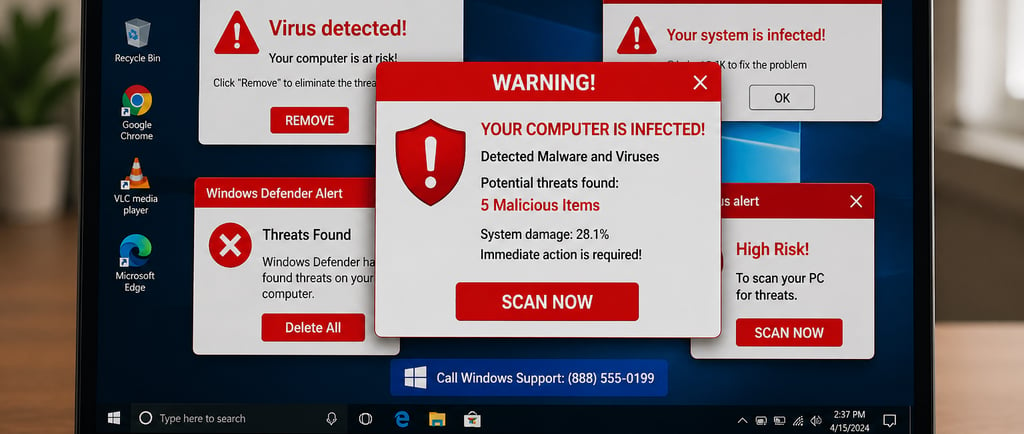
In recent years, internet scams have continued to evolve, with a particular focus on virus scam alerts, which can create significant distress among users. These alerts typically originate from individuals impersonating technical support professionals from well-known companies, such as Microsoft or Apple. Such impersonation occurs through various channels, including unsolicited phone calls, text messages, or alarming pop-up windows on users' devices.
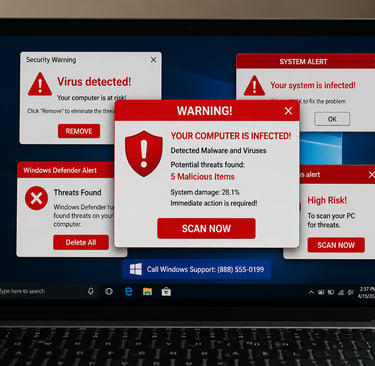
One of the defining characteristics of a virus scam alert is the language employed to elicit panic. Scammers often utilize phrases like "Your computer is infected," or "Critical security alert!" to provoke a sense of urgency. By exaggerating potential threats, they aim to coax users into making hasty decisions. Victims may feel compelled to act quickly to avoid the supposed disaster, ultimately leading them into the scammer's trap.
Additionally, these fraudulent communications frequently include instructions on how to resolve the "issue." These might involve directing users to click on dubious links or download malicious software that can compromise their private information. Furthermore, scammers may request access to users' computers in order to 'fix' the problem, thereby gaining unauthorized control over their devices.
Accompanying the urgent language, scammers may often highlight a sense of legitimacy by referencing well-known tech support names or utilizing official-sounding email addresses. Their tactics are designed to exploit familiarity and trust, which can easily mislead unsuspecting users. Understanding the common characteristics of these virus scam alerts can significantly enhance individuals' defenses against them. Knowledge is key; being aware of these warning signs can help users remain cautious and vigilant, ultimately preventing financial loss and data breaches.
The Trap: How Scammers Gain Access
In today's digital landscape, cybersecurity threats have become increasingly sophisticated, particularly through the use of virus scan alerts that serve as a bait for unsuspecting victims. The scammers employ various tactics to gain remote access to victims' computers, often beginning with a manipulated pop-up warning. This misleading alert typically informs the user that their device is infected with malware or that unauthorized access has occurred, thus provoking immediate concern.
To illustrate, consider a scenario in which a user, let's call her Jane, is browsing online when she encounters a glaring pop-up message. The alert features alarming graphics and language such as "Critical Virus Detected!" It prompts her to contact a provided number for urgent assistance. In this moment of anxiety, Jane mistakenly assumes the alert is legitimate, leading her to ultimately engage with a scammer who answers the call.
The scammer, posing as a technical support agent, further embellishes the situation by claiming that urgent action is required to prevent data theft. They coax Jane into installing remote access software under the guise of needing to "fix" her non-existent malware issue. This seemingly harmless action allows the scammer to control her computer, gaining access to personal files, passwords, and sensitive information. Unfortunately, Jane's initial desire to rectify a fabricated issue inadvertently opened the door to a very real security breach.
Furthermore, through social engineering tactics, scammers build trust and rapport with their victims, manipulating them into disclosing confidential details. By creating scenarios that appear authentic and pressing, they exploit human psychology to navigate a victim's fears and uncertainties. As a result, what begins as a benign internet encounter escalates into a significant cybersecurity threat, underscoring how easily individuals can be trapped in their quest for security.
Real-Life Consequences of the Scam
Virus scan scams have increasingly become a significant concern that can lead to devastating financial and emotional consequences for victims. These scams typically begin with fraudulent pop-up alerts claiming that the user’s device has been infected with malware. Victims are directed to call a specified number, where they are often manipulated into providing remote access to their devices. Once scammers gain this access, they exploit it to carry out unauthorized transactions, resulting in substantial financial losses.
For instance, there have been reports of individuals who unwittingly allowed scammers to access their bank accounts under the pretext of fixing a "virus problem." These offenders can swiftly drain bank accounts or rack up charges on credit cards without the knowledge of the victim. In some cases, victims later discover that their financial information has been sold on the dark web, leading to identity theft and further financial degradation.
Beyond the financial ramifications, the emotional toll that virus scan scams inflict should not be underestimated. Victims often experience feelings of violation and anxiety, struggling to trust technology or even their personal devices afterwards. The psychological burden can be long-lasting, as many individuals grapple with the guilt of falling prey to what appears to be a sophisticated scam. Several cautionary tales highlight situations where victims felt isolated and overwhelmed, doubting their own judgment. Sharing these experiences serves to illustrate the seriousness of virus scan scams and underscores the necessity for awareness and education.
Ultimately, the implications of virus scan scams extend well beyond initial monetary losses, affecting victims' day-to-day lives and mental health. It is crucial to remain vigilant and educate oneself about the tactics used by these scammers to avert such consequences.
Protecting Yourself from Virus Scams
In today's digital landscape, the proliferation of virus scams poses significant risks to individuals and businesses alike. It is essential to arm yourself with the necessary knowledge to detect these scams and protect your personal information effectively. One of the primary steps in safeguarding against virus scams is to stay vigilant and recognize red flags. For instance, unsolicited alerts claiming that your device is infected may often originate from untrusted sources. Always scrutinize the sender's information and avoid interacting with suspicious messages.
When faced with a pop-up notification indicating a supposed virus, refrain from clicking on any links or buttons within the alert. Instead, close the window and conduct a thorough search for reputable information on the claim. Checking the official website of your antivirus software can also provide clarity regarding any potential threats and the legitimacy of the alert.
Consulting legitimate tech support services is crucial. Keep in mind that most reputable companies will never ask for sensitive information over the phone or through unsolicited emails. If you do need assistance, directly contact your service provider or seek support from a trusted professional. This ensures that your inquiries are managed securely and contextually.
Furthermore, safeguarding personal information is paramount. Use strong, unique passwords for all accounts and enable two-factor authentication where possible. Additionally, be cautious when sharing personal data online, particularly on unfamiliar platforms. Adopting secure browsing habits, such as using virtual private networks (VPNs) and being wary of public Wi-Fi networks, can further minimize your vulnerability to virus scams.
Ultimately, being informed about the nature of virus scams and implementing proactive measures will significantly enhance your online safety. Stay educated about current threats, and ensure that you follow best practices to shield yourself from potential scams in the future.
Contact:
Get in touch for personalized IT solutions today:
© 2026 Lime Tree IT, LLC. All rights reserved.